Boolean / Remesh workflow
I don’t like real weapons. Period. But cg weapons? Oh my! there are such beautiful and well crafted models.. Sci-fi ones are my choice, but nice and good looking realistic weapons are fine too!
As a mixture of exercise and test, I decided to try my hand modeling a classic FPS weapon, heavily based on a glock model, with minor licenses. I've also took my sweet time examining the work of one of my favourite artist: Ranulf Busby. There are loads of things going on on each of his works. Take a look now if you haven't yet!
And forgive me if I'm committing flaws. I'm not an expert by any means in weapons 😇
- Hi poly modeling
You'll need a healthy dose of pure poly modeling and subd, oh, and a deep understanding of modifier stack. I'm trying to de-clutter the stack using geo nodes, but there are still some nodes missing like this. So I'll focus on what we have for now. Feel free to use your favourite modeling addon. I'm a big fan of meshmachine and its bevel tools. It feels almost like you're working non destructively!
Things to consider: You need to plan in ahead. If you're modeling straight pieces, be sure to add enough resolution to curves and holes. As everything is made of faces and triangles, these "flat" elements will be tesellated by remesh modifier, so again, be sure to add enough resolution to curved surfaces
You can archive it either manually (yolo on your mouse wheel!) or adding a triangulate+subdivision combo in modifier stack. You need to mark as max creased the sharp edges to get a nice looking result. And of course, some big ngons should be divided in logical parts to help subdivision mod on its job. Now, before you start jumping on that quad topology bandwagon: this is the best part about the workflow. You'll not need to be much worried about it. This is not a wildcard to not learn proper modeling, furthermore, you will need these fundamentals to understand where the issues are.
Mirror, Triangulate, Subd, Remesh, Smooth Corrective and Decimate. BOOM!
You can even keep your booleans live, and that's a great choice to make tweaks later. Worth mentioning that remesh works in object space, and "dices" the object accordingly, Mind on this for for avoid excessive jagged edges on long straight shapes. Also, scale of dicing is relative to object scale. The result is a high dense mesh with nicely beveled edges:

The main drawback: enabling the stack modifier on one single object with a reasonable amount of tesellation, smoothness and decimation can easily go north 10 - 15 seconds on a top-of-line CPU. In my case, enabling the whole modifier stack for all objects takes 3 minutes on my 5950X. So, I'd advice to disable these modifiers when you're satisfied with the results. You can always come back later and adjust something and re-enable them. Work piece by piece, and you should be good to go. If you keep some sort of discipline enabling/disabling, you should be able to work at a nice speed.
The final exported Hi-Poly (size: 587 GBs!)

Final Hi Poly, 21 Million tris. Eevee.
- Low Poly Modeling
As everything was kept live, I just duplicated the base object, and started to craft my "in-game" mesh. As it's intended as a new portfolio entry, I wasn't looking to do a extreme optimization of curves and such, but I kept the final result under 36k tris that I consider a very healthy amount for a small hero prop . Should be perfectly fine on a close up inspection like most FPS do these days.
I also decided to include a texture set per group (Sight, Muzzle, Grip, Body, Attachment and Flashlight)
Using a weighted normal modifier helps to ease normal gradients on certain parts, but sometimes this doesn't work. As a remarkable trick, to avoid high shading gradient that could potentially damage the normal map bake, I used normal transfer on selected parts of the mesh, where hard edge splitting were not enough. Or simply, you can add more support geo, but this can be very time consuming.
Here you can see a simple hard edge based shading and a transferred one from a support mesh with proper normals. Faint shading lines dissapear. These are caused by long thin triangles on that part.
And I cann't stress enough how useful are certain addons, like meshmachine for keep bevels operative and manageable. Final tweaks and cleansing includes deletion of faces that shouln't be visible and shrinkwrap here and there to accurately match high poly and get nicer bakes without overextending the cage.
- UV unwrap and baking
Most people doesn't like unwrap. But I find it very relaxing, and it lets me to spot some troubled areas that I overlooked in previous stages, like rogue faces and duplicated vertex. Nothing new here: Set your materials accordingly with your bake groups and texture sets.

Don't get obsessed with a perfectly homogeneous texel density across the model. It's ok to have some slight degree of variance between groups, but try to keep it stable within groups. It's ok to reduce texel density of certain areas, like the inner part of the muzzle if they're not suppose to be visible during the game. Also, ride on the common lessons: keep straight UVs whenever possible, try to add disposable geo to avoid cylinder bake waviness.. nothing new here. At the central stage, UV Toolkit, Texel density checker and UV Packmaster are the show runners.
Marmoset toolbag turn. After loading my meshes, and setting up my groups and mats, I'm ready to start the baking process. There are tons of tutorials elsewhere for this step, so I'm not doing anything special. After few skewing fixes and tweaks, here's the result:
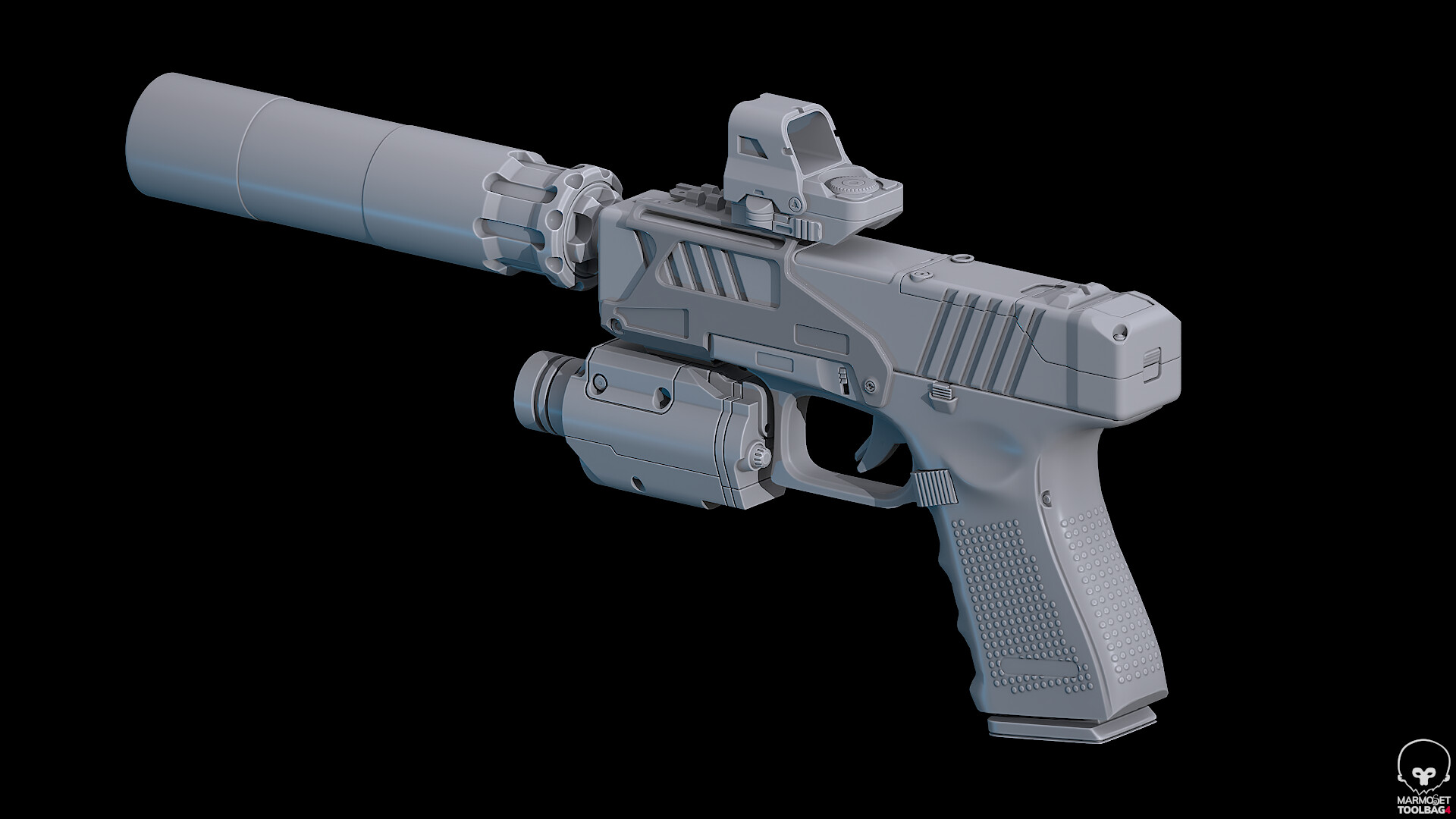

- Texturing and Rendering
This time I've tried to reach higher levels of realism. I'm usually not tied to strictly realistic materials or textures on my sci-fi creations, so I've found very pleasing (yet challenging) to add subtle details to give some ground to the asset. I've tweaked manually all masks coming from different generators and I've stay relatively homogeneous on my base colors.
I've used a texture set covering each part of the weapon and authored my maps at 4k. This is a very common configuration on mid to high end FPS games. It can be reduced to 2k if needed easily , but judging the result in the viewer, I think it can holds pretty well 2k even on a close up angle.
Finally, this is the first time I used Marmoset Toolbag 4 to elaborate my final shoots. Its a breeze to work with, and the quality is superb (here by limitations by Artstation, I can only show 2k textures)
Hope you like it! pew pew!